Cookie choices
None of these are needed to browse the site. Pick what you're comfortable with, and you can change it later from the footer.
If your space owns tools as a group, keep them on one shared account. You can use the multi-account switcher to easily switch between accounts in the user avatar menu dropdown.
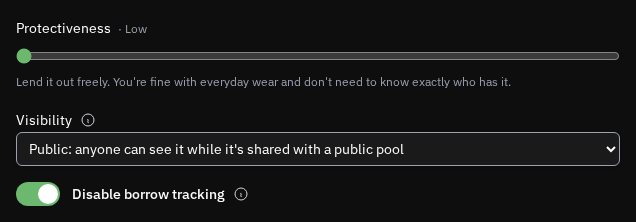
For things that never leave the space, like a workbench or a bandsaw on a stand, tick Disable borrow tracking when you list them. Then nobody has to mark one borrowed and returned, and it always reads as available.
 Open the full-size image
Chats about a shared tool come to the shared account, so the emails land in the shared inbox instead of one person's. Anyone signed in can reply.
A reveal shows the shared account and its profile. Whoever typed the message stays out of it.
If you want two-factor on it, the email method is easier than the app one, since the code goes to an inbox everyone can already read. Both are in User Settings.
User SettingsThe Terms allow a group to hold an account like this. They don't allow giving out the password to your own personal account, and everyone who has the group password still has to be 18.
Terms of ServiceThis tutorial was last updated on August 2026. If this isn't making sense anymore, please let us know at [email protected] and we'll try to update things as soon as possible.
Reconnecting to ToolPool.Garden...